Use Rocka’s hosted checkout page or integrate direct bank payments
Rocka supports two ways to accept open banking payments:
Hosted checkout: use Rocka’s hosted payment page to show customers the available banks for their country.
Custom checkout: show your own bank buttons and send customers directly to their selected bank using Rocka’s API methods.
You can integrate both options. For example, you can add a generic Pay by bank button that directs the customer to Rocka’s bank selection page, as well as several separate buttons for popular banks in your target region.
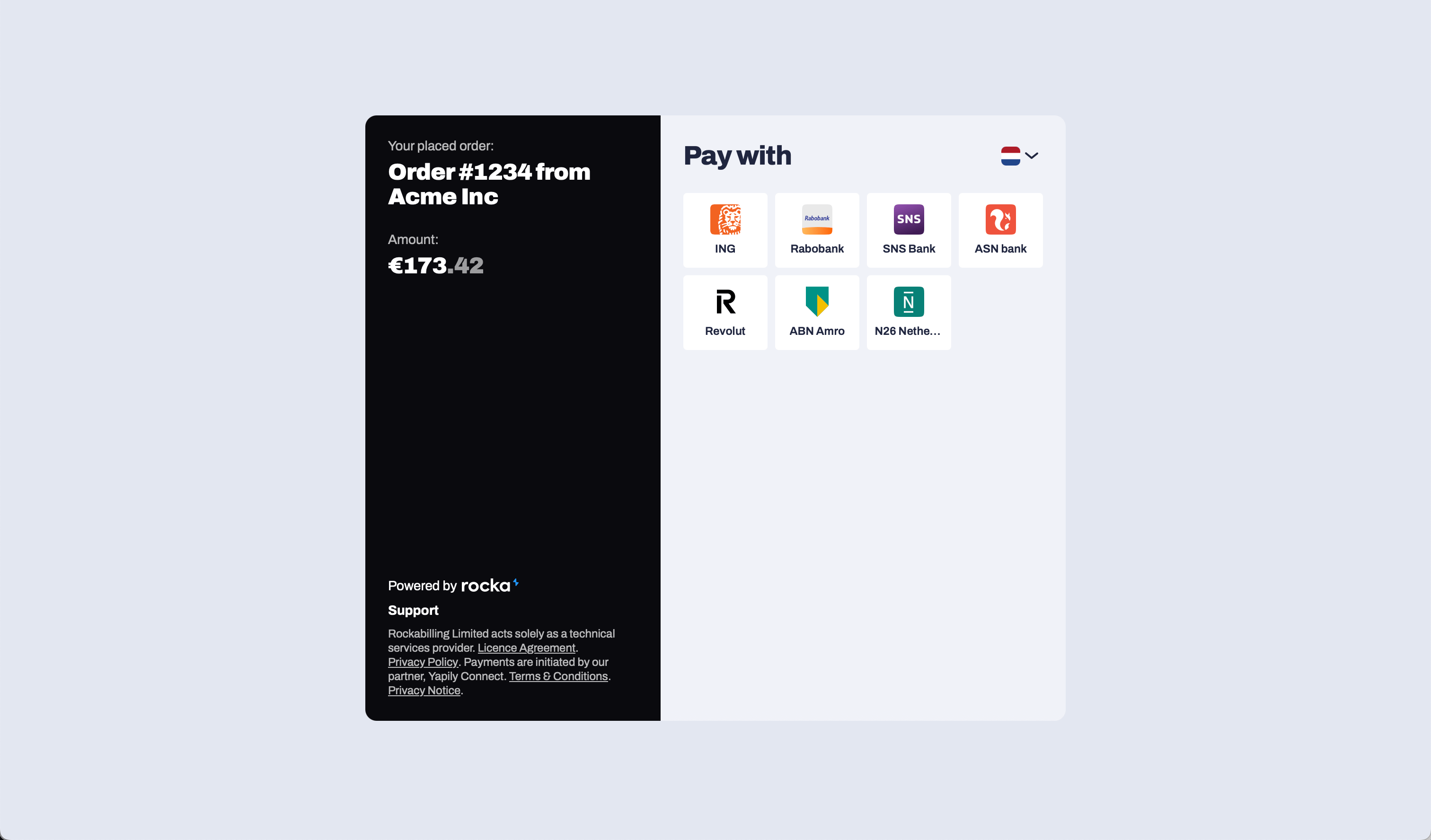
Use hosted checkout if you want Rocka to show the available banks to your customer.With hosted checkout, you add Rocka’s payment button to your website or checkout page. When the customer clicks it, they open Rocka’s hosted payment page, choose their bank, and complete the payment through their banking app or online banking.
Hosted checkout is best if:
you want the fastest way to start accepting open banking payments;
you serve customers in several countries;
you want Rocka to manage the bank selection page for you;
you do not need to build a custom bank selection interface.
To integrate hosted checkout, create a payment using the POST /payments endpoint. You can include the customer’s IP address in the request so Rocka can show the relevant country’s bank list by default.Integrate hosted checkout →
Use direct bank payments if you want to show your own bank buttons in your checkout.With direct bank payments, you choose which banks to show on your website. When the customer clicks a bank button, Rocka sends them directly to that bank’s payment form. This can skip Rocka’s hosted bank selection page.Direct bank payments are best if:
you want full control over the checkout experience;
you want to show specific banks or payment methods;
you want to optimise checkout for specific countries;
you want to make checkout faster for returning customers.
To integrate direct bank payments, create a payment using the POST /payments endpoint and include the iban parameter for the selected bank.Integrate direct bank payments →
After the customer confirms the payment with their bank, Rocka sends you a callback with the payment status. You can use those callbacks to update the payment in your system and show the correct status to the customer. For more details on callbacks, see Callbacks.By default, payments are confirmed when your bank sends Rocka a callback verifying that the funds were deposited into your account. You can enable trusted payments for returning customers. In this case, the payment will be confirmed once the customer’s bank sends a callback confirming that a transaction has been sent out of their account. For more details, see Enable trusted payments.
Last modified on September 3, 2026
Was this page helpful?
{"docsConfig":{"theme":"mint","$schema":"https://mintlify.com/docs.json","name":"Rocka","colors":{"primary":"#1964bd","light":"#1964bd","dark":"#1964bd"},"logo":{"light":"https://mintcdn.com/noda-3d58d286/ro5paAfdML7bI_OL/logo/rocka_blue.svg?fit=max\u0026auto=format\u0026n=ro5paAfdML7bI_OL\u0026q=85\u0026s=6eae653433dc8e9cd2e08ee27ac9f8d7","dark":"https://mintcdn.com/noda-3d58d286/ro5paAfdML7bI_OL/logo/rocka_blue_dark.svg?fit=max\u0026auto=format\u0026n=ro5paAfdML7bI_OL\u0026q=85\u0026s=22ff368a9f1e3f7475e14daa9ea16739"},"favicon":"https://mintcdn.com/noda-3d58d286/ro5paAfdML7bI_OL/favicon.svg?fit=max\u0026auto=format\u0026n=ro5paAfdML7bI_OL\u0026q=85\u0026s=7e158effa7284c7ad20563d8e3c393cf","navbar":{"links":[{"href":"/changelog","label":"Changelog"}],"primary":{"type":"button","label":"Contact support","href":"mailto:support@rocka.live"}},"footer":{},"fonts":{"family":"Archivo"},"errors":{"404":{"redirect":false,"title":"Page not found","description":"Sorry, we couldn't find this page. [Return to home page ➔](https://docs.rocka.live)"}},"contextual":{"options":["download-spec","copy","view","assistant","chatgpt","claude","perplexity","mcp","cursor","vscode"],"display":"header"},"metadata":{"timestamp":true},"styling":{"latex":false},"navigation":{"global":{"anchors":[{"anchor":"Supported countries and banks","icon":"building-columns","href":"/reference/supported-banks"}]},"pages":[]}},"deployment":{"deploymentMetadataValue":{"subdomain":"noda-3d58d286","hasAudioNarration":false,"actualSubdomain":"noda-3d58d286","customDomains":["docs.rocka.live"],"gitSource":{"type":"github","owner":"naudapay","repo":"public-docs","deployBranch":"main","contentDirectory":"","isPrivate":true,"mountPath":"","label":""},"chroma":{"liveDeploymentHistoryId":"6ac38ab9a977681a1facbe92","collectionId":"3016c52a-a3d6-4696-9290-1f588edd6de1","schemaVersion":"v3","latestBuiltDeploymentHistoryId":"6ac38ab9a977681a1facbe92"},"feedback":{"thumbs":true},"entitlements":{"AI_CHAT":{"status":"ENABLED"},"WEB_MCP":{"status":"ENABLED"},"NARRATION":{"status":"ENABLED"}},"buildId":"6adf1c6f808b7de58450e06a","clientVersion":"0.0.3971","searchFilterCounts":[{"language":"default","tag":"Get started with Rocka","count":34},{"language":"default","tag":"API reference","count":18},{"language":"default","tag":"Open banking payments","count":8},{"language":"default","tag":"Introduction","count":6},{"language":"default","tag":"Payouts","count":6},{"language":"default","tag":"Integrate with Rocka","count":5},{"language":"default","tag":"Account settings","count":4},{"language":"default","tag":"Refunds","count":4},{"language":"default","tag":"Reports and reconciliation","count":4},{"language":"default","tag":"Your account details","count":4}]},"assistantConfig":{"enableAskAiButton":false,"enableStarterQuestions":false,"enableAskAiSearchBar":true,"deflection":{"enabled":true,"email":"support@rocka.live","showHelpButton":true}},"basePath":"","hasChatPermissions":true,"hasWebMcpPermissions":true,"toggles":[{"name":"kill-isr","enabled":true,"variant":{"name":"disabled","enabled":false,"feature_enabled":true},"impressionData":false},{"name":"agent-mintlify-slack","enabled":true,"variant":{"name":"disabled","enabled":false,"feature_enabled":true},"impressionData":false},{"name":"editor-v7-file-tree","enabled":true,"variant":{"name":"disabled","enabled":false,"feature_enabled":true},"impressionData":false},{"name":"agent-integrations-settings","enabled":true,"variant":{"name":"disabled","enabled":false,"feature_enabled":true},"impressionData":false},{"name":"automations-pr-grouping","enabled":true,"variant":{"name":"disabled","enabled":false,"feature_enabled":true},"impressionData":false},{"name":"custom-prefix","enabled":true,"variant":{"name":"disabled","enabled":false,"feature_enabled":true},"impressionData":false},{"name":"analytics-v7","enabled":true,"variant":{"name":"disabled","enabled":false,"feature_enabled":true},"impressionData":false},{"name":"user-flows-analytics","enabled":true,"variant":{"name":"disabled","enabled":false,"feature_enabled":true},"impressionData":false},{"name":"no-publish-flow","enabled":true,"variant":{"name":"disabled","enabled":false,"feature_enabled":true},"impressionData":false},{"name":"workos-onboarding","enabled":true,"variant":{"name":"disabled","enabled":false,"feature_enabled":true},"impressionData":false},{"name":"llms-txt-v2","enabled":true,"variant":{"name":"disabled","enabled":false,"feature_enabled":true},"impressionData":false},{"name":"pause-universal-search-reconcile","enabled":true,"variant":{"name":"disabled","enabled":false,"feature_enabled":true},"impressionData":false},{"name":"snapshot-serving-live","enabled":true,"variant":{"name":"disabled","enabled":false,"feature_enabled":true},"impressionData":false},{"name":"stripTemperatureMiddleware","enabled":true,"variant":{"name":"disabled","enabled":false,"feature_enabled":true},"impressionData":false},{"name":"per-site-search-delta","enabled":true,"variant":{"name":"disabled","enabled":false,"feature_enabled":true},"impressionData":false},{"name":"support-platform-pylon-zendesk","enabled":true,"variant":{"name":"disabled","enabled":false,"feature_enabled":true},"impressionData":false},{"name":"snapshot-serving","enabled":true,"variant":{"name":"disabled","enabled":false,"feature_enabled":true},"impressionData":false},{"name":"instant-rollback","enabled":true,"variant":{"name":"disabled","enabled":false,"feature_enabled":true},"impressionData":false},{"name":"granular-notifications-server","enabled":true,"variant":{"name":"disabled","enabled":false,"feature_enabled":true},"impressionData":false},{"name":"granular-notifications","enabled":true,"variant":{"name":"disabled","enabled":false,"feature_enabled":true},"impressionData":false},{"name":"editor-private-page-search","enabled":true,"variant":{"name":"disabled","enabled":false,"feature_enabled":true},"impressionData":false},{"name":"automations-fable","enabled":true,"variant":{"name":"disabled","enabled":false,"feature_enabled":true},"impressionData":false},{"name":"fixed-ai-action-pricing","enabled":true,"variant":{"name":"disabled","enabled":false,"feature_enabled":true},"impressionData":false},{"name":"automation-resolve-merge-conflict","enabled":true,"variant":{"name":"disabled","enabled":false,"feature_enabled":true},"impressionData":false},{"name":"scoped-publishing","enabled":true,"variant":{"name":"disabled","enabled":false,"feature_enabled":true},"impressionData":false},{"name":"mintql","enabled":true,"variant":{"name":"disabled","enabled":false,"feature_enabled":true},"impressionData":false},{"name":"page-level-analytics","enabled":true,"variant":{"name":"disabled","enabled":false,"feature_enabled":true},"impressionData":false},{"name":"editor-version-history-v2","enabled":true,"variant":{"name":"disabled","enabled":false,"feature_enabled":true},"impressionData":false},{"name":"editor-nav-generations","enabled":true,"variant":{"name":"disabled","enabled":false,"feature_enabled":true},"impressionData":false},{"name":"billing-page-v2","enabled":true,"variant":{"name":"disabled","enabled":false,"feature_enabled":true},"impressionData":false},{"name":"workspace-projects","enabled":true,"variant":{"name":"disabled","enabled":false,"feature_enabled":true},"impressionData":false},{"name":"assistant-v5","enabled":true,"variant":{"name":"disabled","enabled":false,"feature_enabled":true},"impressionData":false},{"name":"byok-sep-25","enabled":true,"variant":{"name":"disabled","enabled":false,"feature_enabled":true},"impressionData":false},{"name":"fork-pr-previews","enabled":true,"variant":{"name":"disabled","enabled":false,"feature_enabled":true},"impressionData":false},{"name":"revalidation-jwt","enabled":true,"variant":{"name":"disabled","enabled":false,"feature_enabled":true},"impressionData":false},{"name":"vite-origin","enabled":true,"variant":{"name":"disabled","enabled":false,"feature_enabled":true},"impressionData":false},{"name":"editor-agent-model-picker","enabled":true,"variant":{"name":"disabled","enabled":false,"feature_enabled":true},"impressionData":false},{"name":"billing-updated-9-15","enabled":true,"variant":{"name":"disabled","enabled":false,"feature_enabled":true},"impressionData":false},{"name":"workos-sso-scim","enabled":true,"variant":{"name":"disabled","enabled":false,"feature_enabled":true},"impressionData":false},{"name":"hobby-abuse-scan","enabled":true,"variant":{"name":"disabled","enabled":false,"feature_enabled":true},"impressionData":false},{"name":"dashboard-inbox","enabled":true,"variant":{"name":"disabled","enabled":false,"feature_enabled":true},"impressionData":false},{"name":"workos-signup","enabled":true,"variant":{"name":"disabled","enabled":false,"feature_enabled":true},"impressionData":false},{"name":"workos-enabled","enabled":true,"variant":{"name":"disabled","enabled":false,"feature_enabled":true},"impressionData":false}],"isAtlas":false,"googleFontsInlined":true},"customCss":[{"filePath":"style.css","content":"img[src*=\"icons\"], svg.icon {\n padding: 0 2px !important;\n margin: 0 !important;\n}\n\ndiv[data-page-href=\"/api-reference/authorisation\"] img[src*=\"icons\"], div[data-page-href=\"/api-reference/authorisation\"] svg.icon {\n margin: 0 3px !important;\n}\n\n.prose :where(strong):not(:where([class~=not-prose],[class~=not-prose] *))\n{\n font-weight: 500 !important;\n}\n\n#headerMain {\n background-color: #f2f3f4;\n margin-bottom: 1rem;\n background-size: 100% 100%;\n}\n\n.buttons-nav {\n display: flex;\n margin-top: 1.5rem;\n flex-wrap: wrap;\n align-content: space-between;\n justify-content: center;\n}\n\n.buttons-nav form:first-of-type {\n margin-right: 1rem;\n}\n\n.btn {\n @apply font-bold py-2 px-4 rounded;\n}\n\n.btn-api {\n background: rgb(25 100 189);\n}\n\n.btn-hub {\n color: rgb(25 100 189);\n}\n\n@media (min-width: 1024px) {\n .lg\\:mint-py-32 {\n padding-top: 4rem !important;\n padding-bottom: 4rem !important;\n }\n}\n\n.buttons-nav icon {\n color: inherit;\n}\n\n.dark .icon {\n filter: brightness(0) invert(1);\n}\n\n.dark #headerMain {\n background-color: #232323;\n}\n\n.dark #headerMain span {\n color: #fff !important;\n}\n\n.dark .btn-hub {\n color: white;\n}\n\n.steps {\n margin-top: 0 !important;\n}\n\n/*\ndiv[data-page-title=\"Supported banks\"] table {\n table-layout: fixed !important;\n}\n*/\n\ndiv[data-page-title=\"Supported countries and banks\"] table th {\n font-size: 90%;\n}\n\ndiv[data-page-title=\"Supported countries and banks\"] td {\n height: 2em !important;\n padding: 0 !important;\n}\n\ndiv[data-page-title=\"Supported countries and banks\"] td img {\n margin: 1em .5em 1em 0 !important;\n}\n\n\n.dark div[data-page-title=\"Supported countries and banks\"] td .icon {\n filter: none !important;\n}\n\n.max-w-5xl:has(div[data-page-title=\"Supported countries and banks\"]) {\n max-width: 80rem !important;\n}\n\n.max-w-5xl:has(div[data-page-title=\"Supported countries and banks\"]) .self-start.sticky {\n max-width: 18rem !important;\n}\n\ndiv[data-page-title=\"Supported countries and banks\"] td:first-child {\n display: flex;\n padding: 1em !important;\n align-content: center;\n padding: 2em 0 !important;\n justify-content: flex-start;\n align-items: center;\n}\n\ndiv[data-page-title=\"Supported countries and banks\"] td img {\n float: left !important;\n}\n\ndiv[data-page-title=\"Supported countries and banks\"] td code {\n margin: 1em !important;\n}\n\ndiv[data-page-title=\"Supported countries and banks\"] td:nth-child(2) code {\n display: inline-block;\n}\n\nhtml[data-current-path=\"/\"] .absolute.bottom-0.h-\\[1\\.5px\\].w-full.left-0 {\n display: none !important;\n}"}],"page":{"pagePath":"integration-guide/api/overview","slug":"/integration-guide/api/overview","pageMetadata":{"title":"Getting started with your integration","sidebarTitle":"Getting started","description":"Use Rocka's hosted checkout page or integrate direct bank payments","href":"/integration-guide/api/overview"},"description":{"compiledSource":"\"use strict\";\nconst {jsx: _jsx} = arguments[0];\nconst {useMDXComponents: _provideComponents} = arguments[0];\nfunction _createMdxContent(props) {\n const _components = {\n p: \"p\",\n ..._provideComponents(),\n ...props.components\n };\n return _jsx(_components.p, {\n children: \"Use Rocka’s hosted checkout page or integrate direct bank payments\"\n });\n}\nfunction MDXContent(props = {}) {\n const {wrapper: MDXLayout} = {\n ..._provideComponents(),\n ...props.components\n };\n return MDXLayout ? _jsx(MDXLayout, {\n ...props,\n children: _jsx(_createMdxContent, {\n ...props\n })\n }) : _createMdxContent(props);\n}\nreturn {\n default: MDXContent\n};\n","frontmatter":{},"scope":{}},"pageType":"default","mdx":{"mdxSource":{"compiledSource":"\"use strict\";const{Fragment:_Fragment,jsx:_jsx,jsxs:_jsxs}=arguments[0];const{useMDXComponents:_provideComponents}=arguments[0];function _createMdxContent(props){const _components={a:`a`,code:`code`,li:`li`,ol:`ol`,p:`p`,strong:`strong`,ul:`ul`,..._provideComponents(),...props.components},{Frame,Heading,OptimizedImage,Tip}=_components;if(!Frame)_missingMdxReference(`Frame`,true);if(!Heading)_missingMdxReference(`Heading`,true);if(!OptimizedImage)_missingMdxReference(`OptimizedImage`,true);if(!Tip)_missingMdxReference(`Tip`,true);return _jsxs(_Fragment,{children:[_jsx(_components.p,{children:`Rocka supports two ways to accept open banking payments:`}),`\n`,_jsxs(_components.ol,{children:[`\n`,_jsxs(_components.li,{children:[_jsx(_components.strong,{children:`Hosted checkout`}),`: use Rocka’s hosted payment page to show customers the available banks for their country.`]}),`\n`,_jsxs(_components.li,{children:[_jsx(_components.strong,{children:`Custom checkout`}),`: show your own bank buttons and send customers directly to their selected bank using Rocka’s API methods.`]}),`\n`]}),`\n`,_jsx(Tip,{children:_jsx(_components.p,{children:`You can integrate both options. For example, you can add a generic Pay by bank button that directs the customer to Rocka’s bank selection page, as well as several separate buttons for popular banks in your target region.`})}),`\n`,_jsx(Heading,{level:`3`,id:`hosted-checkout`,children:`Hosted checkout`}),`\n`,_jsx(_components.p,{children:`Use hosted checkout if you want Rocka to show the available banks to your customer.`}),`\n`,_jsx(_components.p,{children:`With hosted checkout, you add Rocka’s payment button to your website or checkout page. When the customer clicks it, they open Rocka’s hosted payment page, choose their bank, and complete the payment through their banking app or online banking.`}),`\n`,_jsx(Frame,{children:_jsx(OptimizedImage,{src:`https://mintcdn.com/noda-3d58d286/3_XSQ0pN7Cu3-xXA/images/overview-payment.png?fit=max\u0026auto=format\u0026n=3_XSQ0pN7Cu3-xXA\u0026q=85\u0026s=f2596c2309d7be4fc84af1780b012601`,alt:`Overview Payment`,\"data-og-width\":`3024`,width:`3024`,\"data-og-height\":`1776`,height:`1776`,\"data-path\":`images/overview-payment.png`,\"data-optimize\":`true`,\"data-opv\":`3`,srcset:`https://mintcdn.com/noda-3d58d286/3_XSQ0pN7Cu3-xXA/images/overview-payment.png?w=280\u0026fit=max\u0026auto=format\u0026n=3_XSQ0pN7Cu3-xXA\u0026q=85\u0026s=b9e455a1f2d3f893a79001ae571e1fa9 280w, https://mintcdn.com/noda-3d58d286/3_XSQ0pN7Cu3-xXA/images/overview-payment.png?w=560\u0026fit=max\u0026auto=format\u0026n=3_XSQ0pN7Cu3-xXA\u0026q=85\u0026s=cfdac14f424959626e44e9d9a1b952d2 560w, https://mintcdn.com/noda-3d58d286/3_XSQ0pN7Cu3-xXA/images/overview-payment.png?w=840\u0026fit=max\u0026auto=format\u0026n=3_XSQ0pN7Cu3-xXA\u0026q=85\u0026s=37a4d98338a0ba2d370b2b0b2a539b55 840w, https://mintcdn.com/noda-3d58d286/3_XSQ0pN7Cu3-xXA/images/overview-payment.png?w=1100\u0026fit=max\u0026auto=format\u0026n=3_XSQ0pN7Cu3-xXA\u0026q=85\u0026s=4f8ee5574061cc64b4ddfc2a7fe6a326 1100w, https://mintcdn.com/noda-3d58d286/3_XSQ0pN7Cu3-xXA/images/overview-payment.png?w=1650\u0026fit=max\u0026auto=format\u0026n=3_XSQ0pN7Cu3-xXA\u0026q=85\u0026s=dfb330e138244c120551c3b21de9c457 1650w, https://mintcdn.com/noda-3d58d286/3_XSQ0pN7Cu3-xXA/images/overview-payment.png?w=2500\u0026fit=max\u0026auto=format\u0026n=3_XSQ0pN7Cu3-xXA\u0026q=85\u0026s=05cd9088539d57b2dcdbcae69f2abf95 2500w`})}),`\n`,_jsx(_components.p,{children:`Hosted checkout is best if:`}),`\n`,_jsxs(_components.ul,{children:[`\n`,_jsx(_components.li,{children:`you want the fastest way to start accepting open banking payments;`}),`\n`,_jsx(_components.li,{children:`you serve customers in several countries;`}),`\n`,_jsx(_components.li,{children:`you want Rocka to manage the bank selection page for you;`}),`\n`,_jsx(_components.li,{children:`you do not need to build a custom bank selection interface.`}),`\n`]}),`\n`,_jsxs(_components.p,{children:[`To integrate hosted checkout, create a payment using the `,_jsx(_components.code,{children:`POST /payments`}),` endpoint. You can include the customer’s IP address in the request so Rocka can show the relevant country’s bank list by default.`]}),`\n`,_jsx(_components.p,{children:_jsx(_components.a,{href:`/integration-guide/api/default-layout`,children:`Integrate hosted checkout →`})}),`\n`,_jsx(Heading,{level:`3`,id:`direct-bank-payments`,children:`Direct bank payments`}),`\n`,_jsx(OptimizedImage,{src:`https://mintcdn.com/noda-3d58d286/3_XSQ0pN7Cu3-xXA/images/pay_with_ing.png?fit=max\u0026auto=format\u0026n=3_XSQ0pN7Cu3-xXA\u0026q=85\u0026s=5c6220f33ab47e0fee00ee2a70251391`,alt:`Pay With Ing`,\"data-og-width\":`546`,width:`546`,\"data-og-height\":`87`,height:`87`,\"data-path\":`images/pay_with_ing.png`,\"data-optimize\":`true`,\"data-opv\":`3`,srcset:`https://mintcdn.com/noda-3d58d286/3_XSQ0pN7Cu3-xXA/images/pay_with_ing.png?w=280\u0026fit=max\u0026auto=format\u0026n=3_XSQ0pN7Cu3-xXA\u0026q=85\u0026s=a066bc77c01a178fe7bfbe5866ea6e7f 280w, https://mintcdn.com/noda-3d58d286/3_XSQ0pN7Cu3-xXA/images/pay_with_ing.png?w=560\u0026fit=max\u0026auto=format\u0026n=3_XSQ0pN7Cu3-xXA\u0026q=85\u0026s=2321d81a31544fc00387f4f9e5f0d7e2 560w, https://mintcdn.com/noda-3d58d286/3_XSQ0pN7Cu3-xXA/images/pay_with_ing.png?w=840\u0026fit=max\u0026auto=format\u0026n=3_XSQ0pN7Cu3-xXA\u0026q=85\u0026s=e63a1939c9a3c75ee1e51d6b91250352 840w, https://mintcdn.com/noda-3d58d286/3_XSQ0pN7Cu3-xXA/images/pay_with_ing.png?w=1100\u0026fit=max\u0026auto=format\u0026n=3_XSQ0pN7Cu3-xXA\u0026q=85\u0026s=287eda07eb3a719d5b4504a3adea3002 1100w, https://mintcdn.com/noda-3d58d286/3_XSQ0pN7Cu3-xXA/images/pay_with_ing.png?w=1650\u0026fit=max\u0026auto=format\u0026n=3_XSQ0pN7Cu3-xXA\u0026q=85\u0026s=8da83c64b34dc2a75be75d6e2db36a6a 1650w, https://mintcdn.com/noda-3d58d286/3_XSQ0pN7Cu3-xXA/images/pay_with_ing.png?w=2500\u0026fit=max\u0026auto=format\u0026n=3_XSQ0pN7Cu3-xXA\u0026q=85\u0026s=a492b2966c18dd3810fb50ea094b0d64 2500w`}),`\n`,_jsx(_components.p,{children:`Use direct bank payments if you want to show your own bank buttons in your checkout.`}),`\n`,_jsx(_components.p,{children:`With direct bank payments, you choose which banks to show on your website. When the customer clicks a bank button, Rocka sends them directly to that bank’s payment form. This can skip Rocka’s hosted bank selection page.`}),`\n`,_jsx(_components.p,{children:`Direct bank payments are best if:`}),`\n`,_jsxs(_components.ul,{children:[`\n`,_jsx(_components.li,{children:`you want full control over the checkout experience;`}),`\n`,_jsx(_components.li,{children:`you want to show specific banks or payment methods;`}),`\n`,_jsx(_components.li,{children:`you want to optimise checkout for specific countries;`}),`\n`,_jsx(_components.li,{children:`you want to make checkout faster for returning customers.`}),`\n`]}),`\n`,_jsxs(_components.p,{children:[`To integrate direct bank payments, create a payment using the `,_jsx(_components.code,{children:`POST /payments`}),` endpoint and include the `,_jsx(_components.code,{children:`iban`}),` parameter for the selected bank.`]}),`\n`,_jsx(_components.p,{children:_jsx(_components.a,{href:`/integration-guide/api/custom-layout`,children:`Integrate direct bank payments →`})}),`\n`,_jsx(Heading,{level:`2`,id:`what-happens-after-the-customer-pays`,children:`What happens after the customer pays`}),`\n`,_jsxs(_components.p,{children:[`After the customer confirms the payment with their bank, Rocka sends you a callback with the payment status. You can use those callbacks to update the payment in your system and show the correct status to the customer. For more details on callbacks, see `,_jsx(_components.a,{href:`/api-reference/callbacks`,children:`Callbacks`}),`.`]}),`\n`,_jsxs(_components.p,{children:[`By default, payments are confirmed when your bank sends Rocka a callback verifying that the funds were deposited into your account. You can enable trusted payments for returning customers. In this case, the payment will be confirmed once the customer’s bank sends a callback confirming that a transaction has been sent out of their account. For more details, see `,_jsx(_components.a,{href:`/manage-your-account/account-settings/enable-trusted-payments`,children:`Enable trusted payments`}),`.`]})]})}function MDXContent(props={}){const{wrapper:MDXLayout}={..._provideComponents(),...props.components};return MDXLayout?_jsx(MDXLayout,{...props,children:_jsx(_createMdxContent,{...props})}):_createMdxContent(props)}return{default:MDXContent};function _missingMdxReference(id,component){throw new Error(`Expected `+(component?`component`:`object`)+\" `\"+id+\"` to be defined: you likely forgot to import, pass, or provide it.\")}","frontmatter":{},"scope":{"config":{},"pageMetadata":{"title":"Getting started with your integration","sidebarTitle":"Getting started","description":"Use Rocka's hosted checkout page or integrate direct bank payments","href":"/integration-guide/api/overview"}}},"mdxSourceWithNoJs":null},"mdxExtracts":{"tableOfContents":[{"title":"Hosted checkout","slug":"hosted-checkout","depth":3,"children":[]},{"title":"Direct bank payments","slug":"direct-bank-payments","depth":3,"children":[]},{"title":"What happens after the customer pays","slug":"what-happens-after-the-customer-pays","depth":2,"children":[]}],"codeExamples":{}},"jsLinks":[],"subdomain":"noda-3d58d286","siteName":"Rocka","title":"Getting started with your integration - Rocka","navMaps":{"firstHrefInVersion":{},"firstHrefInLanguage":{}},"lastModified":"2026-09-03T13:23:50.907Z","gitLastModified":"2026-09-03T13:23:30.000Z","originalFileLocation":"integration-guide/api/overview.mdx"},"headHtml":"\u003cscript data-mint-head>(function(){var d=document.documentElement,p=null;if(!p){try{p=localStorage.getItem(\"isDarkMode\")}catch(e){}if(p==='true')p='dark';else if(p==='false')p='light';if(p!=='light'\u0026\u0026p!=='dark'\u0026\u0026p!=='system')p=\"system\"}var r=p==='system'?(matchMedia(\"(prefers-color-scheme: dark)\").matches?'dark':'light'):p;d.classList.remove(r==='dark'?'light':'dark');d.classList.add(r);d.setAttribute(\"data-theme-preference\",p)})();\u003c/script>\u003cmeta data-mint-head name=\"description\" content=\"Use Rocka\u0026#x27;s hosted checkout page or integrate direct bank payments\">\u003cmeta data-mint-head name=\"application-name\" content=\"Rocka\">\u003cmeta data-mint-head name=\"generator\" content=\"Mintlify\">\u003clink data-mint-head rel=\"icon\" type=\"image/png\" sizes=\"192x192\" href=\"/mintlify-assets/_mintlify/favicons/noda-3d58d286/mwsckqSVdDxa4NJA/_generated/favicon/android-chrome-192x192.png\" media=\"(prefers-color-scheme: light)\">\u003clink data-mint-head rel=\"apple-touch-icon\" type=\"image/png\" sizes=\"180x180\" href=\"/mintlify-assets/_mintlify/favicons/noda-3d58d286/mwsckqSVdDxa4NJA/_generated/favicon/apple-touch-icon.png\">\u003clink data-mint-head rel=\"icon\" type=\"image/png\" sizes=\"16x16\" href=\"/mintlify-assets/_mintlify/favicons/noda-3d58d286/mwsckqSVdDxa4NJA/_generated/favicon/favicon-16x16.png\" media=\"(prefers-color-scheme: light)\">\u003clink data-mint-head rel=\"icon\" type=\"image/png\" sizes=\"32x32\" href=\"/mintlify-assets/_mintlify/favicons/noda-3d58d286/mwsckqSVdDxa4NJA/_generated/favicon/favicon-32x32.png\" media=\"(prefers-color-scheme: light)\">\u003clink data-mint-head rel=\"shortcut icon\" type=\"image/x-icon\" href=\"/mintlify-assets/_mintlify/favicons/noda-3d58d286/mwsckqSVdDxa4NJA/_generated/favicon/favicon.ico\" media=\"(prefers-color-scheme: light)\">\u003clink data-mint-head rel=\"icon\" type=\"image/png\" sizes=\"192x192\" href=\"/mintlify-assets/_mintlify/favicons/noda-3d58d286/mwsckqSVdDxa4NJA/_generated/favicon-dark/android-chrome-192x192.png\" media=\"(prefers-color-scheme: dark)\">\u003clink data-mint-head rel=\"icon\" type=\"image/png\" sizes=\"16x16\" href=\"/mintlify-assets/_mintlify/favicons/noda-3d58d286/mwsckqSVdDxa4NJA/_generated/favicon-dark/favicon-16x16.png\" media=\"(prefers-color-scheme: dark)\">\u003clink data-mint-head rel=\"icon\" type=\"image/png\" sizes=\"32x32\" href=\"/mintlify-assets/_mintlify/favicons/noda-3d58d286/mwsckqSVdDxa4NJA/_generated/favicon-dark/favicon-32x32.png\" media=\"(prefers-color-scheme: dark)\">\u003clink data-mint-head rel=\"shortcut icon\" type=\"image/x-icon\" href=\"/mintlify-assets/_mintlify/favicons/noda-3d58d286/mwsckqSVdDxa4NJA/_generated/favicon-dark/favicon.ico\" media=\"(prefers-color-scheme: dark)\">\u003cmeta data-mint-head property=\"og:title\" content=\"Getting started with your integration - Rocka\">\u003cmeta data-mint-head property=\"og:description\" content=\"Use Rocka\u0026#x27;s hosted checkout page or integrate direct bank payments\">\u003cmeta data-mint-head property=\"og:site_name\" content=\"Rocka\">\u003cmeta data-mint-head property=\"og:url\" content=\"https://docs.rocka.live/integration-guide/api/overview\">\u003cmeta data-mint-head property=\"og:type\" content=\"website\">\u003cmeta data-mint-head property=\"og:image\" content=\"https://noda-3d58d286.mintlify.app/_mintlify/api/og/v2?division=Integrate+with+Rocka\u0026amp;title=Getting+started+with+your+integration\u0026amp;description=Use+Rocka%27s+hosted+checkout+page+or+integrate+direct+bank+payments\u0026amp;theme=36b6667bbd58ee3c8876d1a7\u0026amp;signature=fbe669bd100e140f8f2734760f5a46ccc346b5db9a846a86f99949e5fe5baa66\">\u003cmeta data-mint-head property=\"og:image:width\" content=\"1200\">\u003cmeta data-mint-head property=\"og:image:height\" content=\"630\">\u003cmeta data-mint-head name=\"twitter:card\" content=\"summary_large_image\">\u003cmeta data-mint-head name=\"twitter:title\" content=\"Getting started with your integration - Rocka\">\u003cmeta data-mint-head name=\"twitter:description\" content=\"Use Rocka\u0026#x27;s hosted checkout page or integrate direct bank payments\">\u003cmeta data-mint-head name=\"twitter:image\" content=\"https://noda-3d58d286.mintlify.app/_mintlify/api/og/v2?division=Integrate+with+Rocka\u0026amp;title=Getting+started+with+your+integration\u0026amp;description=Use+Rocka%27s+hosted+checkout+page+or+integrate+direct+bank+payments\u0026amp;theme=36b6667bbd58ee3c8876d1a7\u0026amp;signature=fbe669bd100e140f8f2734760f5a46ccc346b5db9a846a86f99949e5fe5baa66\">\u003cmeta data-mint-head name=\"twitter:image:width\" content=\"1200\">\u003cmeta data-mint-head name=\"twitter:image:height\" content=\"630\">\u003cmeta data-mint-head name=\"msapplication-config\" content=\"/mintlify-assets/_mintlify/favicons/noda-3d58d286/mwsckqSVdDxa4NJA/_generated/favicon/browserconfig.xml\">\u003cmeta data-mint-head name=\"apple-mobile-web-app-title\" content=\"Rocka\">\u003cmeta data-mint-head name=\"msapplication-TileColor\" content=\"#1964bd\">\u003clink data-mint-head rel=\"canonical\" href=\"https://docs.rocka.live/integration-guide/api/overview\">\u003clink data-mint-head rel=\"alternate\" type=\"application/xml\" href=\"/sitemap.xml\">\u003clink data-mint-head rel=\"alternate\" type=\"text/markdown\" href=\"/integration-guide/api/overview.md\">\u003cscript data-mint-head type=\"application/ld+json\">{\"@context\":\"https://schema.org\",\"@graph\":[{\"@type\":\"Organization\",\"@id\":\"https://docs.rocka.live/#organization\",\"name\":\"Rocka\",\"url\":\"https://docs.rocka.live\",\"logo\":{\"@type\":\"ImageObject\",\"url\":\"https://mintcdn.com/noda-3d58d286/ro5paAfdML7bI_OL/logo/rocka_blue.svg?fit=max\u0026auto=format\u0026n=ro5paAfdML7bI_OL\u0026q=85\u0026s=6eae653433dc8e9cd2e08ee27ac9f8d7\"}},{\"@type\":\"WebSite\",\"@id\":\"https://docs.rocka.live#website\",\"name\":\"Rocka\",\"url\":\"https://docs.rocka.live\",\"publisher\":{\"@id\":\"https://docs.rocka.live/#organization\"}},{\"@type\":\"WebPage\",\"@id\":\"https://docs.rocka.live/integration-guide/api/overview#webpage\",\"url\":\"https://docs.rocka.live/integration-guide/api/overview\",\"name\":\"Getting started with your integration\",\"description\":\"Use Rocka's hosted checkout page or integrate direct bank payments\",\"dateModified\":\"2026-09-03T13:23:30.000Z\",\"isPartOf\":{\"@id\":\"https://docs.rocka.live#website\"},\"breadcrumb\":{\"@id\":\"https://docs.rocka.live/integration-guide/api/overview#breadcrumb\"}},{\"@type\":\"BreadcrumbList\",\"@id\":\"https://docs.rocka.live/integration-guide/api/overview#breadcrumb\",\"itemListElement\":[{\"@type\":\"ListItem\",\"position\":1,\"name\":\"Rocka\",\"item\":\"https://docs.rocka.live\"},{\"@type\":\"ListItem\",\"position\":2,\"name\":\"Getting started with your integration\",\"item\":\"https://docs.rocka.live/integration-guide/api/overview\"}]},{\"@type\":[\"Article\",\"TechArticle\"],\"@id\":\"https://docs.rocka.live/integration-guide/api/overview#article\",\"headline\":\"Getting started with your integration\",\"name\":\"Getting started with your integration\",\"description\":\"Use Rocka's hosted checkout page or integrate direct bank payments\",\"url\":\"https://docs.rocka.live/integration-guide/api/overview\",\"mainEntityOfPage\":{\"@id\":\"https://docs.rocka.live/integration-guide/api/overview#webpage\"},\"dateModified\":\"2026-09-03T13:23:30.000Z\",\"publisher\":{\"@id\":\"https://docs.rocka.live/#organization\"},\"isPartOf\":{\"@id\":\"https://docs.rocka.live#website\"}}]}\u003c/script>\u003cscript data-mint-head type=\"application/ld+json\">{\"@context\":\"https://schema.org\",\"@type\":\"WebSite\",\"name\":\"Rocka\",\"creator\":{\"@type\":\"Organization\",\"name\":\"Mintlify\",\"url\":\"https://mintlify.com\"}}\u003c/script>","siteName":"Rocka","nav":{"global":{"anchors":[{"anchor":"Supported countries and banks","icon":"building-columns","href":"/reference/supported-banks"}]},"tabs":[{"tab":"Get started with Rocka","groups":[{"group":"Quickstart","pages":[{"title":"Integrate with Rocka","sidebarTitle":"For developers","href":"/integration-guide/overview"},{"title":"Use Rocka Hub","sidebarTitle":"For business users","description":"Manage your bank details, payments and payouts","href":"/manage-your-account/index"}]},{"group":"Integrate with Rocka","icon":"euro-sign","pages":[{"title":"Getting started with your integration","sidebarTitle":"Getting started","href":"/integration-guide/api/overview"},{"title":"Get your API key","description":null,"href":"/manage-your-account/account-settings/get-your-api-key"},{"title":"Integrate hosted checkout","sidebarTitle":"Integrate hosted checkout","href":"/integration-guide/api/default-layout"},{"title":"Integrate custom checkout","sidebarTitle":"Integrate custom checkout","href":"/integration-guide/api/custom-layout"},{"title":"Test your payment integration","href":"/integration-guide/api/test-your-integration"}]},{"group":"Payouts","icon":"money-bill-transfer","pages":[{"title":"Create a payout","href":"/integration-guide/payouts/create-a-payout"},{"title":"Test your payouts","href":"/integration-guide/payouts/test-your-payouts"},{"title":"View payout details","href":"/manage-your-account/your-balance-and-transactions/view-payout-details"}]},{"group":"Webhooks","pages":[{"title":"Enable webhook notifications","href":"/webhooks/enable-webhook-notifications"},{"title":"Set up extended webhooks","href":"/webhooks/set-up-extended-webhooks"}]},{"group":"Open banking payments","pages":[{"title":"View transaction details","href":"/manage-your-account/your-balance-and-transactions/view-transaction-details"},{"title":"Transaction statuses","href":"/manage-your-account/your-balance-and-transactions/transaction-statuses"},{"title":"Payment decline reasons","href":"/manage-your-account/your-balance-and-transactions/payment-decline-reasons"},{"title":"Resend payment callbacks","href":"/manage-your-account/your-balance-and-transactions/resend-payment-callbacks"}]},{"group":"Your account details","pages":[{"title":"Edit your company details","href":"/manage-your-account/your-account-details/edit-your-company-details"},{"title":"Add a website","href":"/manage-your-account/your-account-details/add-a-website"},{"title":"Remove a website","href":"/manage-your-account/your-account-details/remove-a-website"},{"title":"Understand blocked countries","href":"/manage-your-account/your-account-details/understand-blocked-countries"}]},{"group":"Your bank accounts","pages":[{"title":"Understand bank accounts","href":"/manage-your-account/your-bank-accounts/understand-bank-accounts"},{"title":"Change your bank account details","mode":"default","href":"/manage-your-account/your-bank-accounts/change-your-bank-account-details"}]},{"group":"Reports and reconciliation","pages":[{"title":"Check your balance","href":"/manage-your-account/reports/check-your-balance"},{"title":"Create a payment report","href":"/manage-your-account/reports/create-a-payment-report"},{"title":"Create a payout report","href":"/manage-your-account/reports/create-a-payout-report"},{"title":"Download a report","href":"/manage-your-account/reports/download-a-report"}]},{"group":"Refunds","pages":[{"title":"About refunds","href":"/manage-your-account/refunds/about-refunds"},{"title":"Issue a refund","href":"/manage-your-account/refunds/issue-a-refund"},{"title":"Check refund status","href":"/manage-your-account/refunds/check-refund-status"},{"title":"Refund statuses and timelines","href":"/manage-your-account/refunds/refund-statuses-and-timelines"}]},{"group":"Account settings","pages":[{"title":"Add new users","href":"/manage-your-account/account-settings/add-new-users"},{"title":"Enable multi-factor authentication","href":"/manage-your-account/account-settings/enable-mfa"},{"title":"Change your password","href":"/manage-your-account/account-settings/change-your-password"},{"title":"Enable trusted payments","href":"/manage-your-account/account-settings/enable-trusted-payments"}]}]},{"tab":"API reference","pages":[{"title":"API reference","href":"/api-reference/getting-started"}]}]},"title":"Getting started with your integration - Rocka","buildId":"dpl_DFJrtvUi8HS5F9nkooKuDJsuD5BM","deploymentId":"dpl_DFJrtvUi8HS5F9nkooKuDJsuD5BM","dynamics":["07c022d89b","a74be98ba7"],"chunks":["Frame-COGkNuA6.js","DynamicMarkdown-85clUA0i.js","zoom-image-lightbox-BZxD9MAj.js","lightbox-handle-r17bVUz3.js"]}